Realistic Bookmark and Photo Strip Mockups for Designers
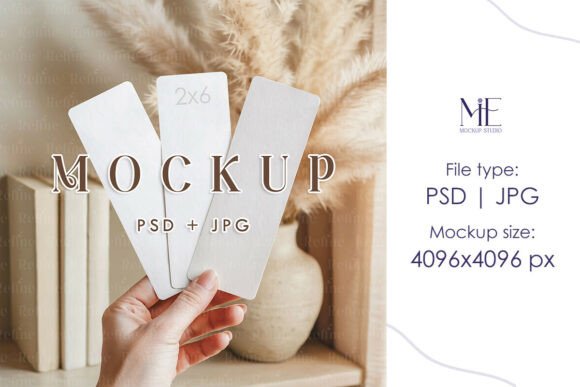
Creating a tangible feel for a digital design is one of the biggest challenges for creative professionals. Whether you are a stationery designer, a wedding photographer, or a small business owner, showing your work in a real-world context builds immediate trust with your audience. This is where a high-quality mockup becomes an indispensable tool. The Hand Holding Bookmark Mockup Photo Strip offers a specific, intimate scenario: a person holding your finished design. This simple action transforms a flat graphic into a believable product, making it perfect for showcasing everything from wedding favors to promotional booklets.
The Visual Appeal of a Hand-Held Mockup
The core strength of this particular mockup lies in its naturalistic presentation. Instead of a design floating on a blank background, you see it being held, which implies use and value. The hand adds a layer of human connection, making the viewer imagine themselves holding the item. The "photo strip" aspect is particularly versatile. It suggests a sequence, perfect for displaying a series of images, a step-by-step guide, or a set of coordinating designs. The 2x6 inch size is a classic bookmark and photo booth strip dimension, making it a familiar and comfortable format for many people. The overall style leans towards a clean, authentic aesthetic. It avoids overly stylized or dramatic lighting, focusing instead on clear visibility of your artwork. This makes it an excellent canvas for a wide range of design styles, from minimalist modern typography to vibrant, illustrative graphics. The mockup doesn't overshadow your work; it frames it.
Practical Applications Across Industries
This type of versatile design asset finds a home in numerous projects. For wedding photographers and stationers, it is ideal for presenting save-the-date strips, photo booth props, or thank-you bookmarks as part of a cohesive brand identity. Imagine showcasing a suite of boho wedding stationery with this mockup; the hand-held view makes each piece feel personal and crafted. Graphic designers can use it to display mini lookbooks, promotional inserts for magazine editorials, or custom social media graphics for clients. The format is also perfect for publishers and authors to visualize bookmark designs for book launches or literary events.
Small business owners and marketers will find it invaluable for presenting loyalty cards, appointment reminders, or special offer strips. A bakery could display a "buy five, get one free" card; a consultant could show a branded checklist. The mockup bridges the gap between a digital concept and a physical marketing tool. For content creators and bloggers, it's a fantastic way to present free printables or digital downloads to their audience, adding a professional sheen to their offerings. The practical, 2x6 bookmark card size is also a standard for many photo booth rental companies, making this mockup a direct representation of a final product they deliver.
Using the PSD File: A Step-by-Step Guide
The usability of a mockup is as important as its appearance. This package is designed for seamless integration into your workflow. Upon purchase, you receive a high-resolution PSD file and a JPG. The key feature is the Smart Object layer. This is a special layer in Adobe Photoshop that acts as a placeholder for your design. Here’s how to use it:
- Open the PSD file in Photoshop.
- In the Layers panel, locate the layer named something like "Your Design Here" or "Smart Object." It is typically marked with a small icon.
- Double-click on the thumbnail of this Smart Object layer. This opens a new, separate Photoshop document (a .PSB file).
- Place your artwork into this new document. You can drag and drop your design from Illustrator or another file. Ensure it fits the canvas, which is set to the 2x6 inch bookmark dimensions.
- Save and close the .PSB file (File > Save, then File > Close).
- Return to the main mockup PSD file. You will now see your design perfectly integrated into the scene, complete with realistic lighting, shadows, and perspective from the hand and background.
This process allows you to update your design in the Smart Object at any time, and the mockup will automatically update. It saves hours compared to manual photo editing and ensures a consistently professional result for every project you present.
Choosing the Right Mockup for Your Project
When evaluating any mockup set, consider the context it provides. Does the setting match the mood of your design? A hand-holding mockup is intimate and personal, ideal for consumer-facing products. A flat lay on a marble surface might suit luxury branding. Always check the resolution; the included 4096x4096 JPG is exceptionally high quality, suitable for both web use and large print proofs without pixelation.
Think about the font and color palette of your own design. A bold, display font on a bright background will stand out clearly in this clean mockup. If your design uses a delicate script font or subtle textures, the mockup's neutral background ensures those details aren't lost. The mockup itself is a neutral typeface—it doesn't compete with your typography. It's a tool for presentation, not a creative font itself. Before finalizing, always test your design within the mockup. Check for readability at the small scale, ensure critical elements aren't obscured by the fingers, and confirm the overall composition feels balanced. This hands-on testing is crucial for delivering polished design assets to your clients or audience.
Ultimately, a well-chosen mockup like the Hand Holding Bookmark Mockup Photo Strip